
Add default featured image in word press


The image on the right side of our header image is featured on the poster . Postake blog highlights interesting features in the image . To create a blog with WordPress featured images are typically used . If your blog is a community blog and this method is particularly useful for you . Because there are many users who publish a post without adding the feature image featured image of the day and forgot to add . This blog post looks very interesting . 

    
Add featured image to wordpress blog default 'Default featured image' plugin will be used . If you use this plugin if you are using a post featured image but not the image of your selected features will be added by default .

    From the 'Default featured image' download the plugin .

1st Step

    Please log in to your WordPress site .
    Dashboard> Plugins> Add New on the go .
    To install the plugin .

Second Step
After the plugin is installed Webster , Dashboard> Settings> Default featured image Go
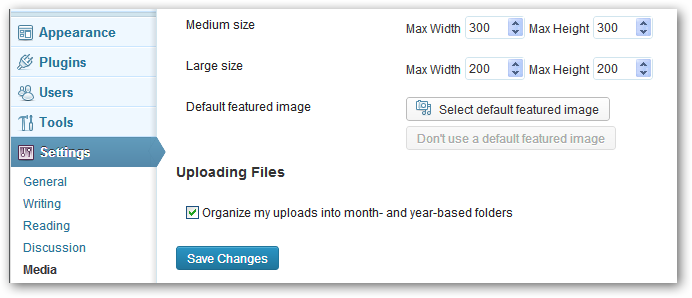


The image displayed on the top of the 'Select Default featured image' click on the image and you want to set the Default featured image upload feature. After the upload feature, select the image size that it would be much pixels. A blog is usually featured image 150x150 pixels. Finally 'Save Change' button.

I hope there will be no problems.

Comments

  1. Add Default Featured Image In Word Press >>>>> Download Now

    >>>>> Download Full

    Add Default Featured Image In Word Press >>>>> Download LINK

    >>>>> Download Now

    Add Default Featured Image In Word Press >>>>> Download Full

    >>>>> Download LINK ee

    ReplyDelete

Post a Comment

Popular Posts

Wordpress wp-login page disable the lost password

Wordpress wp-login page disable the lost password  Today i picked up the wordpress's a necessary plugin. I hope it will be useful to everyone. How   does your Lost password option disable? There's a lot of time lost password option hacker RA injection push to hack your site. How   does your Lost password option disable? There are many ways in which use many lost password option you can disable. You can use HTMl code on wp-login.php can disable. The easiest way to Plugin use.  

Tips to Clean WordPress Dashboard

The world's most usable C M S's basis in the Word Press. Word Press is popular for its easy-to-use and numerous plagina. WordPress as a blogging platform used by more than . Where Visitors enter the post and inserted. Add Widget plugin from the WordPress dashboard is moving. Obtain, use the WordPress plugins directory. Manually, I'll discuss how to remove it. Remove this WordPress Widget none of your theme editor to open the file at the Functions.php. Please type the following code

Please add favicon on your dashboard

Every website needs to have a custom favicon . When we have our favicon in WordPress site ( manually ) when it is added to the front - and looks at the back - end or dashboard shows . Today I 'll show you how to add phebhaaikana inventory dashboard ! Add favicon to your dashboard :

Take Floating Social Media Bar for Blogger

I think a lot of you are biraktibodha repeatedly see the same social Gazette . Whether you are new to it almost as much as ever . Since the internet is being upgraded , so we should like to see the visitors to our site the chance of upgrading an upgrade . Bhijitara always refurbish , beautiful , simple and Gadgets professionals based on site visits to see , which is what I think . Many visitors do not like the site a lot of time if the site goes to the site . That leads sunderera visitor perception . Whatever does not speak, which is why we are discussing the post . Flexible Gazette I 'll discuss with the blogger gauge allows you to use it anywhere on your blog . If you wish it to your blog's right side , left side , top or bottom can be used .
© World Technology Web Design by Salam2050